




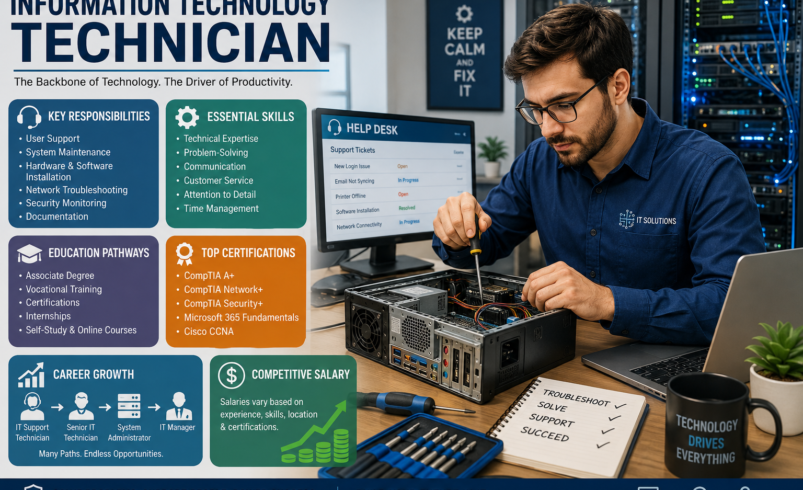

Organizations across all sectors rely heavily on robust and reliable technology infrastructure. Behind the seamless operation of computers, networks, and software stands a critical professional: the information technology technician. These skilled individuals are the backbone of digital operations, ensuring that systems run efficiently, users receive timely support, and technical issues are resolved swiftly. Their work directly impacts productivity, security, and overall business continuity. This article explores the multifaceted responsibilities, essential skills, career pathways, and compensation expectations for those pursuing or interested in this dynamic and in-demand profession.
How IT Technicians Prioritize and Resolve Support Requests
An effective information technology technician does more than respond to problems as they appear. In many organizations, technicians must evaluate the urgency, business impact, number of affected users, and potential security implications of each request before deciding what to address first. A single-user printer problem, for example, may receive a different priority from an outage affecting an entire department.
A practical troubleshooting workflow often includes:
- Identify the problem: Gather information from the user, error messages, system alerts, and available documentation.
- Assess the impact: Determine whether the issue affects one person, multiple users, a critical business application, or an entire network.
- Isolate the cause: Test likely causes systematically instead of changing multiple variables at once.
- Apply an appropriate solution: Resolve the immediate problem while following the organization’s security and change-management procedures.
- Verify the result: Confirm that the system or device is functioning correctly from the user’s perspective.
- Document the resolution: Record the symptoms, diagnosis, solution, and any follow-up recommendations in the organization’s ticketing or documentation system.
This structured approach helps technicians solve problems consistently while creating useful records for recurring incidents and future support requests.
Understanding the Role: What Does an Information Technology Technician Do?
An information technology technician serves as the first line of defense against technical disruptions, providing essential support and maintenance for an organization’s IT systems. Their daily activities are diverse, ranging from routine system checks to urgent troubleshooting, all aimed at keeping technology functioning optimally. Understanding what does an IT technician do involves recognizing their blend of technical expertise and customer service orientation.
The IT Technician Job Description: Core Responsibilities
The typical IT technician job description encompasses a broad spectrum of duties designed to maintain IT infrastructure and support end-users. Key responsibilities often include:
- User Support: Providing technical assistance and support to employees or clients, often through a help desk system, addressing issues related to hardware, software, and network connectivity. This is a primary aspect of IT support technician responsibilities.
- System Maintenance: Performing routine checks, updates, and preventative maintenance on computers, servers, and network devices to ensure optimal performance and security.
- Software Management: Installing, configuring, and updating operating systems and applications, as well as troubleshooting software conflicts and errors.
- Network Troubleshooting: Diagnosing and resolving basic network issues, such as connectivity problems, Wi-Fi access, and printer configurations.
- Hardware Installation and Configuration: Setting up new computers, peripherals, and other IT equipment, ensuring they are properly integrated into the existing infrastructure.
- Documentation: Maintaining accurate records of IT assets, support requests, and resolution steps for future reference and knowledge sharing.
- Security Monitoring: Assisting with basic cybersecurity measures, such as antivirus updates and identifying potential security vulnerabilities.
Common Tools and Technologies Used by IT Technicians
The specific technology stack varies by employer, but an information technology technician may regularly work with several categories of tools:
- Ticketing and service-management platforms: Used to record incidents, assign requests, track progress, and document resolutions.
- Remote-support tools: Allow technicians to diagnose and assist with systems without always needing to visit the user’s workstation.
- Endpoint-management platforms: Help organizations monitor, configure, update, and manage computers and other devices.
- Network diagnostic tools: Utilities such as ping, traceroute, IP configuration tools, and DNS diagnostic commands can help identify connectivity and name-resolution problems.
- Asset-management systems: Used to track computers, peripherals, software, warranties, and equipment assignments.
- Knowledge bases and technical documentation: Provide standardized procedures and previously documented solutions for recurring problems.
Learning how these tools fit into an organization’s support process can be just as important as understanding individual hardware or software components.
Beyond Support: Computer Repair Technician Duties
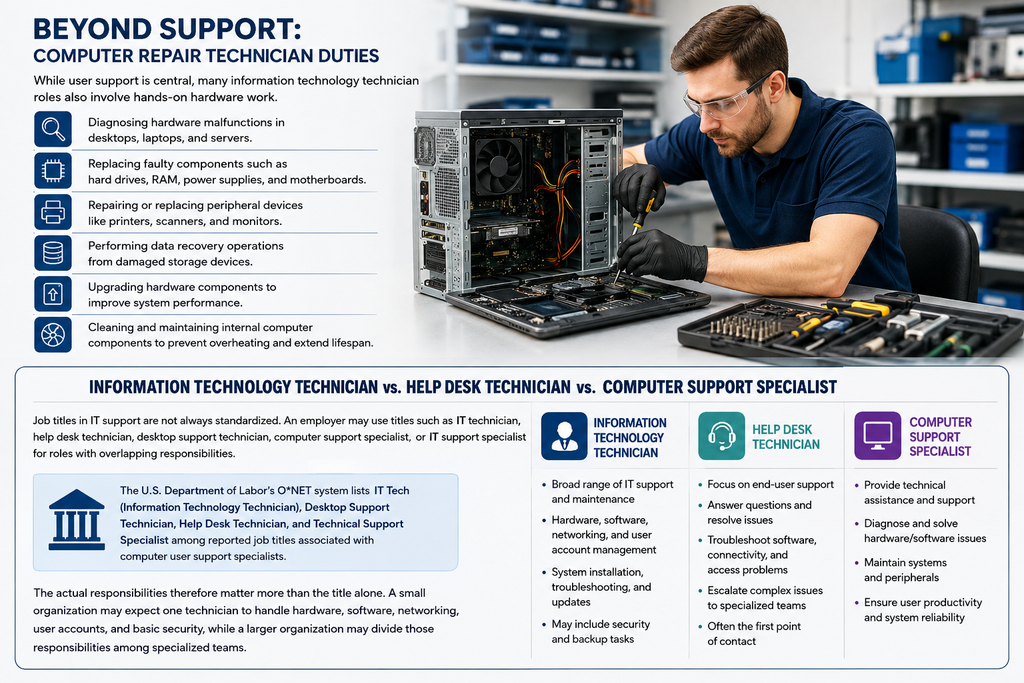
While user support is central, many information technology technician roles also involve hands-on hardware work. Computer repair technician duties focus specifically on the physical components of IT systems. This can include:
- Diagnosing hardware malfunctions in desktops, laptops, and servers.
- Replacing faulty components such as hard drives, RAM, power supplies, and motherboards.
- Repairing or replacing peripheral devices like printers, scanners, and monitors.
- Performing data recovery operations from damaged storage devices.
- Upgrading hardware components to improve system performance.
- Cleaning and maintaining internal computer components to prevent overheating and extend lifespan.
Information Technology Technician vs. Help Desk Technician vs. Computer Support Specialist
Job titles in IT support are not always standardized. An employer may use titles such as IT technician, help desk technician, desktop support technician, computer support specialist, or IT support specialist for roles with overlapping responsibilities.
The U.S. Department of Labor’s O*NET system lists IT Tech (Information Technology Technician), Desktop Support Technician, Help Desk Technician, and Technical Support Specialist among reported job titles associated with computer user support specialists.
The actual responsibilities therefore matter more than the title alone. A small organization may expect one technician to handle hardware, software, networking, user accounts, and basic security, while a larger organization may divide those responsibilities among specialized teams.
Essential Skills Required for an Information Technology Technician
Success as an information technology technician demands a robust combination of technical knowledge and interpersonal abilities. The blend of these skills is what truly defines the effectiveness of an IT professional. Understanding the IT technician skills required is crucial for anyone looking to enter or advance in this field.
Technical Competencies for IT Professionals
A strong technical foundation is non-negotiable for an information technology technician. Key technical competencies include:
- Operating System Proficiency: In-depth knowledge of Windows, macOS, and various Linux distributions, including installation, configuration, and troubleshooting.
- Networking Fundamentals: Understanding of TCP/IP, DNS, DHCP, basic routing, switching concepts, and network cabling.
- Hardware Knowledge: Familiarity with computer components, their functions, and how to diagnose and replace them.
- Software Applications: Proficiency with common office suites (e.g., Microsoft 365, Google Workspace), enterprise resource planning (ERP) systems, and other business-critical applications.
- Basic Cybersecurity Awareness: Knowledge of common threats, best practices for data protection, and the use of security tools like antivirus software and firewalls.
- Cloud Computing Basics: An understanding of cloud services (e.g., AWS, Azure, Google Cloud) and how they integrate with on-premise systems.
Cultivating Crucial Soft Skills for IT Technicians
Beyond technical prowess, the most effective information technology technician possesses strong soft skills. These are equally important for navigating complex user interactions and problem-solving scenarios:
- Problem-Solving: The ability to logically diagnose issues, identify root causes, and implement effective solutions, often under pressure.
- Communication: Clearly explaining technical concepts to non-technical users, both verbally and in writing, and actively listening to understand user needs.
- Customer Service: A patient, empathetic, and professional approach when assisting users, ensuring a positive support experience.
- Attention to Detail: Meticulousness in following procedures, documenting issues, and configuring systems to prevent errors.
- Adaptability: The capacity to learn new technologies quickly and adjust to evolving IT environments and user demands.
- Time Management: Efficiently prioritizing and managing multiple support requests and projects.
A Practical IT Technician Troubleshooting Example
Consider a situation in which an employee reports that their computer cannot access a company application. An effective technician would not necessarily begin by reinstalling the application. Instead, the technician could first determine whether the problem affects only that employee or multiple users.
The technician might then check the user’s network connection, confirm account access, review relevant error messages, test access to other services, and compare the affected system with a functioning workstation. If the issue is identified as an account, network, software, or permissions problem, the technician can apply the appropriate fix and then verify access.
The final step is documentation. Recording the symptoms, root cause, resolution, and any preventive recommendation gives other technicians useful information if the same issue occurs again.
This example illustrates an important professional principle: effective IT troubleshooting is generally a process of evidence gathering, isolation, testing, resolution, and verification, rather than simply trying random fixes.
Charting Your Course: How to Become an Information Technology Technician
For individuals aspiring to a career in IT support, there are several clear pathways to becoming an information technology technician. The journey often involves a combination of formal education, practical experience, and industry certifications.
Educational Pathways and Entry-Level IT Technician Jobs
While a four-year bachelor’s degree in computer science or a related field can be beneficial, it is not always a strict requirement for entry level IT technician jobs. Many successful IT technicians begin their careers with:
- Associate’s Degree: A two-year degree in Information Technology, Computer Support, or Network Administration provides a solid foundation.
- Vocational Training Programs: Technical schools and community colleges offer focused programs that provide hands-on skills directly applicable to the role.
- Self-Study and Online Courses: Many individuals gain foundational knowledge through self-paced learning platforms and online certifications.
- Internships and Apprenticeships: Gaining practical experience through internships or apprenticeships is invaluable for securing initial positions. These opportunities provide real-world exposure and often lead to full-time employment.
A Practical Roadmap for Becoming an Information Technology Technician
For someone starting from the beginning, an effective pathway can be divided into several stages:
- Build foundational knowledge: Learn computer hardware, operating systems, networking fundamentals, basic cybersecurity, and troubleshooting principles.
- Practice hands-on skills: Set up test environments, work with operating systems, troubleshoot common technical problems, and become comfortable reading technical documentation.
- Develop customer-support skills: Practice explaining technical problems in simple language and documenting solutions clearly.
- Consider an entry-level certification: Choose a certification that matches the type of support work you want to pursue.
- Gain practical experience: Internships, apprenticeships, volunteer technology projects, campus IT positions, or entry-level support roles can help demonstrate practical ability.
- Build a targeted résumé: Highlight troubleshooting projects, relevant technical skills, certifications, and measurable support experience rather than listing technology terms without context.
- Specialize gradually: After gaining experience, consider networking, systems administration, cybersecurity, cloud computing, or another IT specialty.
The exact path varies by employer and location. U.S. Bureau of Labor Statistics data indicate that educational expectations differ across computer support occupations, while some computer user support roles can be entered with some college education and on-the-job training.
Valued IT Technician Certifications
Industry certifications are highly regarded by employers as they validate specific skill sets and demonstrate a commitment to professional development. For an information technology technician, several certifications stand out:
- CompTIA A+: This foundational certification covers hardware, software, networking, operating systems, and security, making it ideal for entry-level roles.
- CompTIA Network+: Focuses on networking concepts, infrastructure, operations, and security, essential for roles involving network support.
- CompTIA Security+: Validates core cybersecurity skills, important for technicians involved in maintaining secure IT environments.
- Microsoft Certified: Azure Fundamentals / Microsoft 365 Certified: Fundamentals: These certifications demonstrate proficiency with Microsoft’s cloud services and productivity tools, which are widely used in businesses.
- Cisco Certified Network Associate (CCNA): For those specializing in networking, the CCNA is a highly respected certification.
How to Choose the Right IT Technician Certification
Certification should support a career goal rather than become a substitute for practical experience. Someone pursuing general desktop or technical support may benefit from a foundational certification, while a technician who already has support experience may choose a networking, cloud, or cybersecurity credential.
Before enrolling, compare the certification’s current objectives with the technologies and job descriptions used by employers you want to target. Certification requirements and exam objectives can change, so applicants should always verify current information directly with the issuing organization.
Career Growth and Compensation for an IT Technician
The role of an information technology technician offers not only a stable career but also significant opportunities for growth and competitive compensation. Understanding the financial aspects and potential career progression is key for aspiring and current professionals.
Understanding the IT Technician Salary Landscape
The IT technician salary can vary significantly based on several factors, including geographic location, level of experience, specific technical skills, certifications held, and the size and industry of the employing organization. Entry-level positions typically offer a starting salary that increases steadily with experience and the acquisition of specialized skills. Technicians working in metropolitan areas or for larger corporations often command higher salaries. For instance, an information technology technician with specialized skills in cybersecurity or cloud platforms may earn more than one focused solely on basic desktop support.
Current U.S. IT Support Salary and Employment Snapshot
Salary information should be evaluated using a specific occupation, location, experience level, and date because the title “IT technician” can cover several different types of support work.
As a current U.S. benchmark, the U.S. Bureau of Labor Statistics reported May 2025 median annual wages of $61,860 for computer user support specialists and $76,220 for computer network support specialists. BLS also reported a $62,890 median annual wage for computer support specialists overall. These figures are occupational benchmarks rather than a guaranteed salary for every information technology technician.
The same BLS data project overall employment of computer support specialists to decline by 3% from 2025 to 2035, while still projecting approximately 48,700 openings per year on average because of workers leaving or transferring from these occupations. This distinction is important: employment growth and the availability of job openings are not the same measurement.
Readers outside the United States should use local government labor statistics or reputable national salary data rather than applying U.S. figures directly to their market.
The IT Help Desk Career Path and Beyond
The role of an information technology technician often serves as a foundational step in a broader IT career. Many begin their journey on an IT help desk career path, gaining invaluable experience in user support and troubleshooting. From there, advancement opportunities are plentiful:
- Senior IT Technician / Team Lead: Taking on more complex issues, mentoring junior technicians, and managing support queues.
- Network Administrator: Specializing in managing and maintaining an organization’s network infrastructure.
- Systems Administrator: Focusing on server management, operating systems, and enterprise applications.
- Cybersecurity Analyst: Shifting to roles dedicated to protecting systems and data from threats.
- Cloud Engineer: Specializing in designing, deploying, and managing cloud-based solutions.
- IT Manager: Moving into leadership roles, overseeing IT departments and strategy.
Continuous learning and obtaining advanced certifications are crucial for navigating these career transitions and achieving higher earning How Automation and AI Are Changing IT Technician Work
Automation is changing the nature of technical support rather than eliminating the need for technical judgment in every situation. Organizations increasingly use automated tools for routine troubleshooting, password-related workflows, monitoring, and other repetitive support activities.
The U.S. Bureau of Labor Statistics notes that the use of automated tools such as chatbots is expected to reduce the number of computer user support specialists needed overall, while potentially allowing remaining specialists to focus on more complex troubleshooting and cases requiring greater attention.
For aspiring technicians, this makes higher-value skills increasingly useful. Troubleshooting complex problems, understanding networks and systems, communicating with users, documenting solutions, recognizing security issues, and knowing when to escalate a problem can help differentiate human technical support from purely automated assistance.
### What Employers Can Look for in an Entry-Level IT Technician
Job requirements vary by organization, but candidates can strengthen their applications by demonstrating evidence of:
- Practical hardware and operating-system troubleshooting.
- Basic networking and connectivity knowledge.
- Familiarity with ticketing and documentation processes.
- Security-conscious technical habits.
- Ability to communicate with non-technical users.
- Willingness to learn unfamiliar systems and tools.
- Experience gained through internships, labs, projects, volunteer work, or previous support positions.
- Relevant certifications where they align with the target position.
Instead of simply listing “troubleshooting” on a résumé, candidates can make their experience more meaningful by describing the type of problem they handled, the tools or methods used, and the outcome.
Frequently Asked Questions About the Information Technology Technician Role
Here are answers to common questions about becoming and working as an information technology technician:
What does an IT technician do on a daily basis?
A typical day for an information technology technician involves a mix of responding to user support tickets, troubleshooting hardware and software issues, performing system updates, setting up new equipment, and documenting their work. The specific tasks can vary based on the organization’s size and needs.
What education is required to become an IT technician?
While a bachelor’s degree is an option, many successful IT technicians hold an associate’s degree, have completed vocational training, or possess industry certifications like CompTIA A+. Practical experience, often gained through internships or entry-level roles, is also highly valued.
What are the career prospects for an IT technician?
Career prospects are strong. An information technology technician can advance into specialized roles such as network administrator, systems administrator, cybersecurity analyst, or cloud engineer. Leadership positions like IT manager are also attainable with experience and further education.
Is an IT technician a good career choice?
Yes, it is a rewarding career for those who enjoy problem-solving and working with technology. There is consistent demand for skilled IT professionals, offering job stability, opportunities for continuous learning, and competitive compensation.
### Do IT technicians need coding skills?
Programming is not usually the central responsibility of an entry-level IT technician, but basic scripting and automation knowledge can become valuable as a technician advances. Understanding simple scripts can help with repetitive administrative tasks, system configuration, troubleshooting, and automation.
The amount of coding required depends heavily on the position. A desktop support role may require little programming, while systems administration, cloud, DevOps, or cybersecurity positions can involve substantially more scripting.
### Can an IT technician work remotely?
Some IT technician responsibilities can be performed remotely, particularly software troubleshooting, account support, remote device management, and help-desk work. However, roles involving physical hardware installation, cabling, equipment replacement, or on-site infrastructure may require the technician to be present at the workplace.
The balance between remote and on-site work depends on the organization’s infrastructure, security requirements, support model, and job responsibilities.
### What is the difference between an IT technician and a systems administrator?
An IT technician typically focuses more heavily on user support, endpoint troubleshooting, equipment setup, and routine technical problems. A systems administrator generally has broader responsibility for servers, operating systems, infrastructure, accounts, configurations, and system availability.
There can be significant overlap between the roles, especially in smaller organizations where one IT professional may perform responsibilities associated with both positions.
What skills should an aspiring IT technician practice first?
A strong starting point is to learn operating-system troubleshooting, computer hardware, networking fundamentals, account and permission concepts, basic cybersecurity, documentation, and communication. Hands-on practice is particularly valuable because IT support involves applying technical concepts to unfamiliar problems rather than simply recalling definitions.
Conclusion: The Future is Bright for the Information Technology Technician
The role of an information technology technician is more vital than ever in our technology-driven world. These professionals are the unsung heroes who keep our digital systems running, troubleshoot complex issues, and ensure that individuals and organizations can leverage technology effectively. With a blend of technical expertise, strong problem-solving abilities, and excellent communication skills, an IT technician can build a stable and rewarding career. The continuous evolution of technology ensures a constant demand for skilled professionals, offering diverse pathways for specialization and advancement. For those passionate about technology and dedicated to helping others, a career as an information technology technician presents a future filled with opportunity and impact.