




Understanding the landscape of registered businesses in California is essential for entrepreneurs, legal professionals, and consumers alike. A thorough California business entity search provides critical insights into existing entities, helping to prevent conflicts, verify legitimacy, and ensure compliance. Whether you are planning to register a new business, researching a potential partner, or simply seeking information about a company, knowing how to effectively search for a business in California is a valuable skill. This guide will walk you through the process, explain why these searches are important, and help you interpret the results.
Article Quick-Reference Guide
| Search Goal | Best Official Tool / Agency | Fee | Direct Link / Requirement |
| State LLC / Corp / LP Records | California Secretary of State (bizfile Online) | Free | bizfileonline.sos.ca.gov |
| Fictitious Business Names (DBAs) | County Clerk / Recorder Office | Varies by County ($10–$50) | Respective County Registrar Portal |
| Federal Trademarks & Service Marks | USPTO Trademark Electronic Search System (TESS) | Free | uspto.gov |
| Name Reservation (60 Days) | California SOS Online Filing | $10 | Name Reservation Request Form |
| Certificate of Status (Good Standing) | California SOS Online Document Request | $5 | Instant electronic PDF download |
Why Conduct a California Business Entity Search?
Performing a business entity search in California serves multiple vital purposes, extending beyond mere curiosity. It’s a foundational step for new ventures and an ongoing necessity for due diligence.
Ensuring Name Availability and Uniqueness
One of the primary reasons to conduct a California business entity search is to confirm the availability of a desired business name. Before filing formation documents for an LLC or corporation, it is crucial to check business name availability in California. The state requires that new entity names be distinguishable from existing registered names to avoid confusion and legal issues. A comprehensive search helps prevent the time and expense of submitting documents only to have them rejected due to a naming conflict. It ensures your chosen name is unique and can be legally registered.
> Legal Standard Note: Under the California Corporations Code (§ 201 for Corporations and § 17701.08 for LLCs), the Secretary of State will reject any proposed entity name that is “likely to mislead the public” or is the same as, or deceptively similar to, an existing name on record. Distinguishability goes beyond simple spelling differences—subtle variations, Roman numerals, or punctuation changes often fail the examiner’s review if the core business identity creates consumer confusion.
Due Diligence and Verification
For individuals and businesses considering partnerships, investments, or contractual agreements, a California business entity lookup is an indispensable due diligence tool. It allows you to find a business in California and verify its official existence, registration details, and current status. This verification process helps confirm the legitimacy of a business, identify its registered agent, and understand its operational standing, thereby mitigating risks associated with fraudulent or non-existent entities. Consumers can also use this process to verify businesses they intend to patronize.
Legal and Regulatory Compliance
Verifying a business’s status is often a requirement for legal and regulatory compliance. Before entering into significant contracts, initiating legal proceedings, or ensuring adherence to specific industry regulations, confirming an entity’s active status and registered information through a California business entity search is essential. This step helps ensure that all parties involved are legally recognized and in good standing with the state.
How to Perform a California Business Entity Search
The official source for conducting a California business entity search is the California Secretary of State. Their online portal provides public access to registered business information.
Utilizing the California Secretary of State Business Search Portal
The primary tool for finding information on registered businesses is the California Secretary of State business search portal. This online database allows users to search for corporations, limited liability companies (LLCs), limited partnerships, and other business entities registered with the state. Accessing the SOS California business search is typically free and provides real-time data on entity status and basic registration details.
The state operates its official portal through bizfile California (bizfileonline.sos.ca.gov). When landing on the portal, locate the prominent “Search” module under the Business Entities tile. Unlike legacy versions of the site, the current bizfile engine aggregates corporate records, LP/LLC filings, and digital document archives into a single unified search index that does not require an account or login credentials to view public files.
Step-by-Step Search Process
To how to search for a business in California using the Secretary of State’s online tool, follow these general steps:
- Access the Portal: Navigate to the California Secretary of State’s business search webpage.
- Select Search Type: Most portals offer various search options, such as searching by entity name, entity number, or even by registered agent name. For a name search, you might choose between ‘Exact Match’, ‘Starts With’, or ‘Contains’ to broaden or narrow your results.
- Enter Search Criteria: Input the full or partial name of the business you are looking for. Be mindful of spelling and common abbreviations.
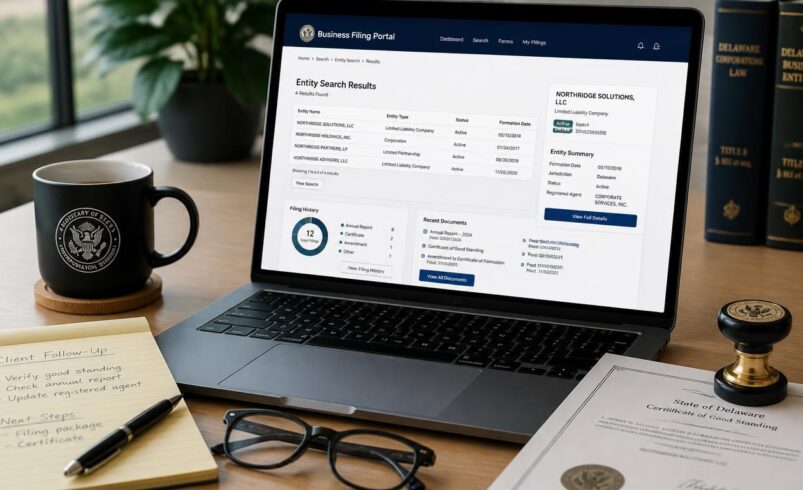
- Review Results: The system will display a list of entities matching your criteria. Each entry typically includes the entity name, entity number, and type of entity (e.g., corporation, LLC).
- View Details: Click on a specific entity to view more detailed information, such as its filing date, current status, and registered agent for service of process.
- Download Public PDF Filings: Click the “View History” tab within the entity profile. Here, the state provides instant, free PDF downloads of the original Articles of Incorporation/Organization and every filed periodic Statement of Information, giving you unedited access to historical officer lists and addresses.
Searching by California Entity ID Number (Format Rules)
Searching by entity number provides the fastest, most precise lookup by bypassing similarly named companies entirely. However, query entries depend on when the business was formed:
- Modern Entity IDs (12-Digit Format): Entities registered via the modern bizfile system receive a 12-digit number starting with the letter “B” (e.g., B12345678901). When searching modern records, include the full alphanumeric string.
- Legacy Corporations (7-Digit Format): Older corporations possess a 7-digit ID preceded by the letter “C” (e.g., C1234567). If the system returns an error or no match, remove the leading “C” and input the 7 numerical digits directly.
- Legacy LLCs & Limited Partnerships (12-Digit Numerical Format): Older LLCs generally display a 12-digit purely numeric ID (often beginning with a year or four-digit sequence such as 2021… or 2022…). Enter the digits consecutively with no hyphens or spaces.
Understanding California Business Entity Search Results
Once you perform a California business entity lookup, understanding the information presented is crucial for making informed decisions.
Key Information Provided
A typical search result for a registered business entity in California will provide several pieces of important data:
Entity Name: The official name as registered with the state.
Entity Number: A unique identification number assigned by the Secretary of State. • Entity Type: Specifies whether it’s a Corporation, LLC, Limited Partnership, etc.
Jurisdiction: Indicates where the entity was formed (e.g., California, Delaware).
Formation Date/Registration Date: The date the entity was officially formed or registered to do business in California.
Status: The current legal standing of the entity (e.g., Active, Suspended, Dissolved).
Agent for Service of Process: The individual or entity designated to receive legal documents on behalf of the business.
Principal Office Address: The main business address on file.
Statement of Information Due Date: Indicates the deadline by which the business must file its next periodic update (annually for corporations, biennially for LLCs) to prevent administrative penalties or suspension.
Detailed Standing Indicators (Multi-Agency Breakdown): Modern bizfile entity cards break good standing into four separate agency lines: Standing – SOS (compliance with annual/biennial filings), Standing – FTB (compliance with state tax filings and fees), Standing – Agent (whether a designated process agent is actively on file), and Standing – VCFCF (Victims of Corporate Fraud Compensation Fund compliance for corporations).
Interpreting Business Status
The ‘Status’ field is particularly important. Here’s what some common statuses mean:
Active: The entity is in good standing and legally authorized to conduct business in California.
Suspended: The entity has failed to meet certain state requirements, often related to tax filings or annual statements. It cannot legally conduct business or exercise its corporate powers.
Dissolved/Cancelled: The entity has formally ceased to exist as a legal entity.
Forfeited: Similar to suspended, often due to failure to meet tax or filing obligations. An ‘Active’ status is generally what you want to see when verifying a legitimate, operational business.
Understanding SOS Suspensions vs. FTB Suspensions
A business listed as “Suspended” or “Forfeited” typically falls under one of two jurisdictions, each requiring a specific remedy:
SOS Suspended (Secretary of State): Occurs when the entity fails to submit its periodic Statement of Information (Form LLC-12 for LLCs or Form SI-550 for Corporations) on time. To restore active status, the entity must submit the delinquent form along with statutory filing fees and any accrued late penalties ($250 corporate penalty).
FTB Suspended / Forfeited (Franchise Tax Board): Triggered by failure to file mandatory state tax returns or failure to pay the annual minimum $800 Franchise Tax (under the California Revenue and Taxation Code). An FTB suspension strips the company of its capacity to defend lawsuits or enforce contractual agreements. Curing an FTB suspension requires submitting delinquent returns, paying outstanding balances, and completing Form FTB 3557 (Application for Certificate of Revivor).
How to Order Official Certificates of Status
While viewing status online is sufficient for casual due diligence, third-party transactions—such as securing commercial bank financing, obtaining government contracts, or qualifying as a foreign entity in another state—frequently require an official Certificate of Status (often referred to as a Certificate of Good Standing). Through the Secretary of State’s bizfile portal, users can order certified verification:
- Online Request: Search for the entity on bizfile, click “Request Certificate,” and generate an official PDF bearing the California state seal and digital signature verification code.
- Statutory Fee: The standard fee for an online Certificate of Status is $5.00, delivering instant verification of active authority to conduct business in the state.
Specific Business Entity Searches in California
While the general search process applies to most entities, there are specific considerations for common business structures.
California LLC Name Search
When conducting a California LLC name search, it’s important to remember that LLC names must include specific designators like “Limited Liability Company” or its abbreviations (“LLC” or “L.L.C.”). When performing your search, try both the full name with the designator and the name without it, as the search function might prioritize exact matches. This helps ensure you capture all relevant results and accurately check business name availability California for your proposed LLC.
California Corporation Search
Similarly, a California corporation search requires attention to corporate designators. Corporation names typically include terms like “Corporation,” “Incorporated,” “Company,” “Limited,” or their abbreviations (“Corp.”, “Inc.”, “Co.”, “Ltd.”). When searching, consider trying variations with and without these designators to ensure a comprehensive search. The goal is to identify any existing corporation that might have a name too similar to your intended one.
Other Entity Types
The California Secretary of State business search also allows you to find information on other entity types, such as limited partnerships, general partnerships (if registered), and non-profit corporations. The search methodology remains largely consistent, focusing on the entity’s registered name or entity number. Always specify the entity type if the search portal offers that filter, as it can refine your results significantly.
Unearthing Inactive, Merged, and Dissolved Entities (Advanced Filter Tips)
The default basic search on bizfile prioritizes active entities, capping display output at 500 records. For in-depth legal diligence, asset acquisitions, or litigation research, uncovering legacy entities requires using the “Advanced Search” toggle:
Filter by Status: Check boxes for Cancelled, Dissolved, Merged Out, or Terminated. This reveals whether a business entity previously existed under that name or restructured via a statutory merger.
Filter by Date Range: Refine searches using “Initial Filing Date” parameters to trace corporate lineage, predecessor organizations, or historical shifts in registered agency.
Reusing Dissolved Entity Names: Finding a dissolved entity does not automatically make the name free to take. If an entity was dissolved involuntarily due to tax forfeiture, the name remains reserved or encumbered under Franchise Tax Board rules until tax revivor issues are definitively settled or cleared.
Comprehensive 3-Tier Name Clearance Checklist
A common pitfall for new founders is assuming that finding an open name on the Secretary of State portal guarantees full legal ownership. Name clearance requires a three-tier clearance procedure:
State Business Registry (California SOS): Confirms that no other corporation, LLC, or LP holds legal rights to the exact or confusingly similar name within California.
County Fictitious Business Name (DBA) Registries: Sole proprietorships, general partnerships, and existing corporations operating under alternate trading names registered at the county level (e.g., Los Angeles County Registrar-Recorder/County Clerk). These entities do not appear in the state-level SOS database. Check the county records in every California county where you intend to conduct operations.
Federal and State Trademarks: Search both the California Trademark Database (managed by the SOS) and the United States Patent and Trademark Office (USPTO) database. A federally registered trademark gives its owner nationwide priority, meaning a trademark holder can legally compel you to cease using your entity name even if the California SOS initially approved your registration.
Tips for an Effective California Business Entity Search
To maximize the accuracy and efficiency of your California business entity search, consider these practical tips.
Exact vs. Partial Matches
When using the search portal, you’ll often have options for how the search engine matches your input:
Exact Match: This will only return results that precisely match your entered name. Use this when you know the exact legal name.
Starts With: This is useful if you know the beginning of the name but are unsure of the full spelling or specific designators.
Contains: This broadens the search to include any entity name that has your entered text anywhere within it. Use this for general exploration or when you have only a partial name.
For initial name availability checks, it’s often best to start with a ‘Contains’ or ‘Starts With’ search to catch similar names, then refine with an ‘Exact Match’ once you have a clearer idea.
Common Pitfalls to Avoid
Typos and Misspellings: Even a single incorrect letter can lead to no results. Double-check your spelling.
Abbreviations: Be aware that some businesses might register with abbreviations (e.g., “Co.” instead of “Company”). Try searching with both the full word and its abbreviation.
Punctuation and Symbols: The search engine might treat punctuation differently. If a search fails, try removing or altering punctuation.
Ignoring Designators: As mentioned for LLCs and corporations, always consider variations with and without legal designators (e.g., “LLC”, “Inc.”).
Not Checking All Relevant Databases: While the Secretary of State is primary for entity registration, local business licenses or federal trademarks are separate. A name might be available at the state level but conflict with a local or federal registration.
Overlooking Restricted Words: California law bars certain words from being used in entity names without specific regulatory licenses or pre-approvals. Words such as “Bank,” “Trust,” “Trustee,” “Insurance,” “Assurance,” and professional designations like “Engineer” or “Architect” require specialized statutory clearance before the Secretary of State will accept filings.
Frequently Asked Questions About California Business Entity Searches
What is the primary website for a California business entity search?
The official website for conducting a California business entity search is the Business Search page provided by the California Secretary of State. This is the authoritative source for registered business information.
Can I reserve a business name after checking its availability?
Yes, after you check business name availability in California and find a suitable name, you can typically reserve it for a limited period (usually 60 days) by filing a Name Reservation Request form with the California Secretary of State. A fee is associated with this service.
The statutory fee for reserving an entity name with the California Secretary of State is $10. Reservations can be filed directly online through bizfile California and will hold the name for 60 calendar days, during which time no other entity can register that name or a deceptively similar one.
What if the name I want is already taken?
If your desired name is already registered, you will need to choose an alternative. Consider modifying your preferred name by adding a descriptive word, a geographical indicator, or a unique identifier. For example, if “Golden State Consulting” is taken, you might try “Golden State Premier Consulting” or “Golden State Consulting Group.” Always perform a new California business entity search for any modified name.
Is there a fee to perform a California business entity lookup?
No, performing a basic online California business entity lookup through the California Secretary of State’s website is generally free of charge. You can access public information about registered entities without incurring a fee.
How often is the California Secretary of State business search database updated?
The SOS California business search database is updated regularly, often in real-time or near real-time, as new filings and changes to existing entities are processed. However, there can sometimes be a slight delay between a filing being submitted and its appearance in the public search results. For critical decisions, it’s always advisable to perform the search as close to your filing date as possible.
Can I search for sole proprietorships or general partnerships on this portal?
No. Sole proprietorships and general partnerships that have not registered formal liability shields are maintained at the county level where the business conducts activity. To search for these businesses, you must query the Fictitious Business Name (FBN/DBA) database held by the local County Clerk or Registrar-Recorder in each respective county.
Can I see who owns an LLC or corporation through the California entity search?
The state search profile lists the Agent for Service of Process, principal officers (such as CEO, Secretary, and CFO for corporations), and managers or managing members (for LLCs) as disclosed on the most recently filed Statement of Information. However, California does not mandate the public listing of silent partners, non-managing shareholders, or non-managing LLC members.
What should I do if an entity search shows my own company as FTB or SOS Suspended?
If your entity has fallen into suspended status, immediately review your profile history on bizfile to confirm the missing document. And if suspended by the Secretary of State, submit an updated Statement of Information (Form LLC-12 or SI-550) online with the filing fee and $250 penalty. Also if suspended by the Franchise Tax Board, contact the FTB Business Entities section at (916) 845-6600, pay all delinquent taxes, penalties, and interest, and file an Application for Certificate of Revivor (Form FTB 3557) to restore corporate powers.
Conclusion
The ability to perform an accurate and efficient California business entity search is a fundamental skill for anyone interacting with the state’s business environment. From ensuring name uniqueness for new ventures to conducting essential due diligence on existing companies, the information available through the California Secretary of State’s portal is invaluable. By understanding the process, interpreting the results, and applying effective search strategies, you can confidently navigate the complexities of business registration and verification in California.