



Good Wireless Gaming Headset: Features, Buying Guide, and Expert Tips
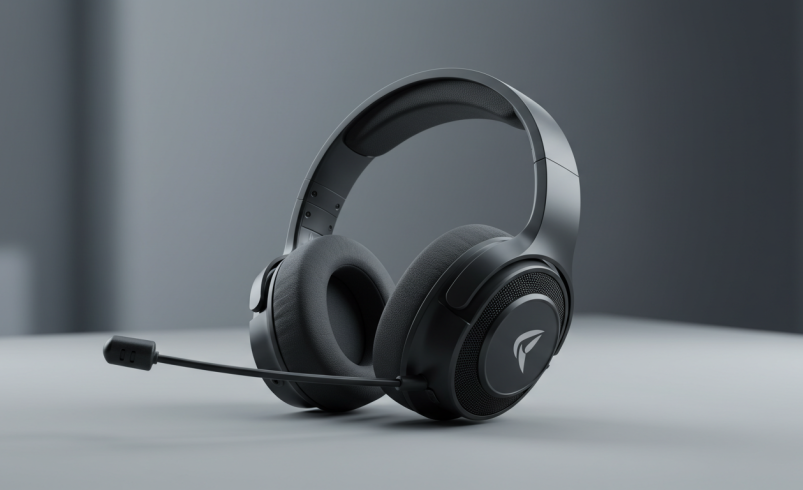
The freedom of movement offered by a wireless gaming headset can significantly enhance a gaming experience, removing the constraints of tangled cables and allowing players to move freely without interrupting their audio or communication. Beyond mere convenience, a truly good wireless gaming headset integrates advanced audio technology, robust connectivity, and ergonomic design to deliver an immersive and competitive edge. This guide explores the critical factors that define a superior wireless gaming headset and provides insights to help you make an informed decision.
How to Evaluate a Wireless Gaming Headset Before Buying### How to Evaluate a Wireless Gaming Headset Before Buying
A useful evaluation should look beyond headline specifications. When comparing wireless gaming headsets, consider the complete experience: sound reproduction, positional imaging, microphone performance, comfort, wireless stability, battery behavior, platform compatibility, and software support. Manufacturer specifications can help establish what a headset is designed to offer, but real-world performance can vary depending on the game, platform, environment, settings, and individual preferences.
For a more reliable comparison, evaluate competing headsets under similar conditions. Use the same gaming platform and similar volume levels when possible, test microphone clarity in a normal gaming environment, and compare advertised battery life with the features enabled that you actually intend to use. This approach provides a more useful picture than judging a headset from a single specification such as driver diameter or maximum battery capacity.
Key Features Defining a Good Wireless Gaming Headset## Key Features Defining a Good Wireless Gaming Headset
When evaluating wireless gaming headsets, several core characteristics distinguish exceptional models from average ones. Understanding these features is crucial for selecting a device that meets your specific gaming demands.
Exceptional Wireless Gaming Headset Sound Quality### Exceptional Wireless Gaming Headset Sound Quality
Audio fidelity is paramount for immersion and competitive play. A headset with exceptional wireless gaming headset sound quality provides clear, detailed audio, allowing players to pinpoint enemy footsteps, environmental cues, and dialogue with precision. Key aspects include:
- Driver Size: Larger drivers (e.g., 50mm) generally move more air, contributing to a fuller sound profile with deeper bass and clearer highs.
- Frequency Response: A wider frequency response range (e.g., 20 Hz to 20,000 Hz) indicates the headset can reproduce a broader spectrum of sounds, from low rumbles to high-pitched alerts.
- Spatial Audio: Technologies like virtual surround sound (e.g., DTS Headphone:X, Dolby Atmos, Sony’s Tempest 3D AudioTech) create a three-dimensional soundscape, enhancing positional awareness in games.
- Audio Profiles: Many headsets offer customizable EQ settings or pre-set audio profiles optimized for different game genres, allowing users to tailor the sound to their preferences.
It is important not to judge audio quality from driver size or frequency-response numbers alone. Driver tuning, imaging, distortion, enclosure design, EQ implementation, and the quality of the audio processing can all influence how a headset sounds. For competitive games, accurate imaging and the ability to distinguish nearby sounds may be more useful than simply having stronger bass.
Understanding Spatial Audio and Positional Sound### Understanding Spatial Audio and Positional Sound
Spatial-audio features can be useful for games designed around directional sound, but their effectiveness depends on the headset, software, game audio mix, and the player’s preferences. Some players may prefer a virtual spatial mode for positional cues, while others may find a well-tuned stereo presentation more natural. If possible, compare both modes rather than assuming that a surround or spatial setting will automatically provide better competitive performance.
Clear Wireless Gaming Headset Microphone Quality### Clear Wireless Gaming Headset Microphone Quality
Effective team communication is vital, especially in multiplayer games. A wireless gaming headset microphone quality must be clear, ensuring your teammates hear you without distortion or background noise. Look for:
- Noise Cancellation: Microphones with active or passive noise cancellation reduce ambient sounds, focusing on your voice.
- Broadcast Quality: Some high-end microphones offer near-broadcast quality, making your voice sound natural and rich.
- Sidetone (Mic Monitoring): This feature allows you to hear your own voice through the headset, preventing you from shouting and ensuring natural speaking volume.
- Detachable/Retractable Mics: These designs offer flexibility, allowing you to remove or stow the microphone when not needed, which is convenient for solo play or travel.
When assessing microphone quality, listen for more than volume. Important factors include speech intelligibility, background-noise handling, consistency when turning your head, plosive control, and whether your voice remains natural at different speaking volumes. A microphone that sounds excellent in a quiet room may perform differently in a busy gaming environment.
Comfortable Wireless Gaming Headset Design### Comfortable Wireless Gaming Headset Design
Long gaming sessions demand a comfortable wireless gaming headset. Discomfort can distract from gameplay and lead to fatigue. Consider these design elements:
- Ear Cup Materials: Breathable fabrics (like velour) can prevent heat buildup, while leatherette offers better noise isolation. Memory foam padding conforms to the head for a snug fit.
- Headband Adjustability: A flexible and adjustable headband, often with suspension systems, distributes weight evenly across the head, reducing pressure points.
- Weight: Lighter headsets generally cause less strain during extended use.
- Clamping Force: The headset should provide a secure fit without excessive pressure on the ears or temples.
Comfort is highly individual, so published weight alone should not determine the final choice. Ear-cup depth, headband padding, clamping force, adjustment range, glasses compatibility, and heat retention can all affect how comfortable a headset feels. If possible, check the return policy before purchasing a headset online, particularly when fit is difficult to predict.
Reliable Wireless Gaming Headset Battery Life### Reliable Wireless Gaming Headset Battery Life
Uninterrupted gameplay is key. A reliable wireless gaming headset battery life prevents mid-session power outages. Features to consider include:
- Duration: Look for headsets offering at least 20-30 hours of battery life on a single charge for extended play. Some models exceed 50 hours.
- Fast Charging: The ability to gain several hours of playtime from a short charge (e.g., 15 minutes for 3 hours of use) is highly beneficial.
- Charging Options: USB-C charging is standard, and some premium models offer wireless charging docks for added convenience.
Battery ratings should be treated as manufacturer estimates rather than guaranteed real-world runtime. Features such as lighting, wireless mode, microphone use, volume, and software settings can affect actual battery consumption. Also check whether the headset can be used while charging and whether it provides a low-battery warning before shutting down.
Low Latency Wireless Gaming Headset Performance### Low Latency Wireless Gaming Headset Performance
For competitive gaming, minimal audio delay is critical. A low latency wireless gaming headset ensures that what you hear is perfectly synchronized with what you see on screen. This is primarily achieved through:
- 2.4GHz Wireless: Most dedicated gaming headsets use a 2.4GHz USB dongle, which provides a stable, low-latency connection superior to standard Bluetooth for gaming.
- Proprietary Wireless Technologies: Some manufacturers develop their own low-latency wireless protocols to further optimize performance.
- Bluetooth Codecs: While Bluetooth generally has higher latency, newer codecs like aptX Low Latency can improve performance, though they are still typically not as fast as 2.4GHz for gaming.
Latency should be evaluated as an overall system characteristic rather than by connection type alone. The headset, transmitter, codec, operating system, console, game, and audio-processing settings can all affect perceived delay. For fast-paced competitive games, a dedicated low-latency wireless mode is generally the feature to prioritize, while Bluetooth can be more useful for general listening and device compatibility.
Wireless Range and Connection Stability### Wireless Range and Connection Stability
Connection stability is another practical consideration that is easy to overlook. A headset may have excellent audio quality but still be frustrating if the wireless connection frequently drops or becomes unreliable. Consider the expected wireless range, obstacles between the headset and transmitter, nearby wireless devices, and whether the USB transmitter can be positioned for a clear connection.
For desktop gaming, a USB extension cable can sometimes make it easier to position a wireless dongle away from crowded ports or obstructions. The exact result depends on the headset and environment, so real-world testing is more informative than relying solely on a stated maximum range.
Wireless Gaming Headset Testing Methodology## Wireless Gaming Headset Testing Methodology
A transparent testing process can make headset recommendations more trustworthy. A practical evaluation should assess each model across the same core categories: sound quality, microphone clarity, comfort, battery performance, wireless reliability, latency, and platform compatibility.
To evaluate a headset thoroughly, test its sound quality across different gaming situations, including immersive single-player experiences and competitive multiplayer matches. Check microphone clarity by recording speech in a typical room and testing it with moderate background noise. During longer sessions, assess comfort by paying attention to pressure, heat buildup, ear-cup fit, and adjustment flexibility. Finally, monitor battery life through regular use and compare the results with the manufacturer’s claimed capacity while keeping the tested settings consistent.
The goal is not to declare one headset universally best. Instead, testing should identify which models perform best for specific priorities, such as competitive gaming, long sessions, console compatibility, microphone quality, or value.
Top Recommendations: Finding the Best Wireless Gaming Headset## Top Recommendations: Finding the Best Wireless Gaming Headset
While specific product recommendations can vary with market availability and personal preference, understanding the characteristics of top-tier headsets for different platforms and budgets is essential.
Best Wireless Gaming Headset for PC### Best Wireless Gaming Headset for PC
A top-tier best wireless gaming headset for PC typically offers robust software suites for extensive customization, high-resolution audio support, and versatile connectivity options. These headsets often feature advanced virtual surround sound technologies, allowing for precise positional audio, and may include dual-wireless connectivity (2.4GHz and Bluetooth) for simultaneous connection to multiple devices. Integrated DACs (Digital-to-Analog Converters) can further enhance audio fidelity.
PC users should also consider the quality and usefulness of the companion software. EQ controls, microphone settings, firmware updates, button remapping, sidetone adjustment, and device switching can make a meaningful difference over time. Before purchasing, confirm that the software supports the operating system and features you actually intend to use.
Wireless Gaming Headset for PS5### Wireless Gaming Headset for PS5
For PlayStation 5 users, a dedicated wireless gaming headset PS5 compatible model is designed to leverage the console’s Tempest 3D AudioTech, providing an immersive spatial audio experience. These headsets often offer seamless integration with the PS5’s user interface, allowing for easy volume and chat mix adjustments directly from the console. Look for models that specifically mention PS5 compatibility and optimized audio profiles.
PS5 buyers should verify the exact connection method rather than assuming that every wireless headset provides identical console functionality. Check whether the required USB transmitter is included, whether chat and game audio both work as expected, and whether important controls remain available when the headset is connected to the console.
Wireless Gaming Headset for Xbox### Wireless Gaming Headset for Xbox
An ideal wireless gaming headset Xbox compatible model utilizes the Xbox Wireless protocol, ensuring a direct, low-latency connection to the console without the need for a USB dongle. This provides a streamlined setup and reliable performance. These headsets often include features like game/chat balance controls and are designed to integrate smoothly with the Xbox ecosystem.
Xbox compatibility deserves particular attention because wireless connection methods can differ substantially between models. Confirm that the headset supports your specific Xbox console and check whether PC connectivity, Bluetooth, or additional devices require a separate connection method or adapter.
Budget Wireless Gaming Headset Options### Budget Wireless Gaming Headset Options
A budget wireless gaming headset doesn’t mean sacrificing all quality. Affordable options can still deliver a good balance of performance and features. These headsets typically prioritize essential elements like solid 2.4GHz wireless connectivity, decent sound reproduction, and a clear microphone. While they might forgo premium materials or advanced software features, many provide excellent value for their price point, making wireless gaming accessible.
At lower price points, prioritize the features that are difficult to compromise on: reliable wireless connectivity, acceptable microphone clarity, comfortable fit, and dependable battery performance. Extra software features or premium materials may be less important if the headset’s basic gaming experience is already strong.
Your Wireless Gaming Headset Buying Guide## Your Wireless Gaming Headset Buying Guide
Navigating the options for a new headset can be complex. This wireless gaming headset buying guide helps simplify the process.
Compatibility Considerations### Compatibility Considerations
Before purchasing, confirm that the headset is compatible with your primary gaming platforms. While many headsets offer multi-platform support, some are optimized for specific consoles (e.g., Xbox Wireless for Xbox, USB dongle for PC/PS5/Switch). Check for compatibility with PC, PlayStation, Xbox, Nintendo Switch, and mobile devices if you plan to use it across multiple systems.
Compatibility should include more than simply checking whether a headset can produce sound. Verify microphone support, wireless functionality, game/chat controls, available software, Bluetooth support, and whether all advertised features work on your preferred platform. A headset can technically connect to a device while still offering a reduced feature set.
Setting Your Budget for a Wireless Gaming Headset### Setting Your Budget for a Wireless Gaming Headset
Determine a realistic budget. A budget wireless gaming headset can range from $50-$100, offering core functionality. Mid-range options ($100-$200) often introduce better build quality, enhanced audio features, and improved comfort. Premium headsets ($200+) deliver top-tier sound, advanced features, and superior materials. Understanding what features are available at different price points will help manage expectations.
Prices and product availability can change by retailer, region, sales period, and product generation. Treat these price ranges as general buying categories rather than fixed quality thresholds. A newer or discounted mid-range headset can sometimes offer a better overall value than an older premium model.
Prioritizing Features: What Matters Most?### Prioritizing Features: What Matters Most?
Your gaming habits should dictate which features you prioritize. If competitive multiplayer is your focus, prioritize low latency wireless gaming headset performance and exceptional wireless gaming headset microphone quality. For immersive single-player experiences, focus on superior wireless gaming headset sound quality and a comfortable wireless gaming headset design. If you game for extended periods, robust wireless gaming headset battery life becomes crucial. Use this wireless gaming headset buying guide to align features with your personal needs.
A simple priority checklist can help prevent paying for features you will rarely use:
- Competitive FPS: prioritize latency, imaging, microphone clarity, and connection stability.
- Single-player gaming: prioritize sound tuning, spatial presentation, comfort, and immersion.
- Long gaming sessions: prioritize fit, padding, clamping force, heat management, and battery life.
- Multi-platform gaming: prioritize connection flexibility and confirmed compatibility with every device you use.
- Gaming and mobile use: prioritize Bluetooth support or another convenient secondary connection method.
Common Buying Mistakes to Avoid## Common Buying Mistakes to Avoid
Choosing a wireless gaming headset based on specifications alone can lead to disappointment. Common mistakes include assuming a larger driver is automatically better, selecting a headset without verifying platform compatibility, relying entirely on advertised battery life, and overlooking microphone performance.
Another common mistake is paying for features that do not match your gaming habits. Competitive players may benefit more from reliable low-latency connectivity than from cosmetic features, while casual players may value comfort and multi-device connectivity more highly. Matching the headset to the actual use case is often more important than choosing the model with the longest feature list.
Expert Tip: Separate Specifications From Real-World Performance## Expert Tip: Separate Specifications From Real-World Performance
Specifications are useful for narrowing down options, but they should not be treated as a complete measure of quality. Battery capacity, driver diameter, frequency range, wireless protocol, and advertised microphone features describe what a product offers on paper. They do not necessarily predict how it will sound, fit, or perform in every gaming environment.
For a more trustworthy purchase decision, combine manufacturer specifications with independent testing, platform-specific compatibility information, warranty details, return policies, and user experiences. This layered approach provides a stronger basis for deciding whether a headset is genuinely suitable for your needs.
Frequently Asked Questions About Good Wireless Gaming Headsets## Frequently Asked Questions About Good Wireless Gaming Headsets
Here are answers to common questions regarding wireless gaming headsets.
- Are wireless headsets good for competitive gaming? Yes, modern 2.4GHz wireless gaming headsets offer extremely low latency, making them suitable for competitive gaming where audio cues are critical.
- What’s the difference between 2.4GHz and Bluetooth? 2.4GHz wireless uses a dedicated USB dongle for a direct, low-latency connection, ideal for gaming. Bluetooth is more universal but generally has higher latency, making it less suitable for competitive gaming unless using specific low-latency codecs.
- How long should a wireless gaming headset battery last? A good wireless gaming headset should offer at least 20-30 hours of battery life on a single charge. Many premium models now exceed 50 hours.
- Can I use a wireless gaming headset with my phone? Many wireless gaming headsets include Bluetooth connectivity, allowing them to pair with mobile devices. If not, some may offer a 3.5mm wired connection option.
- Does a higher-priced wireless gaming headset always sound better? Not necessarily. Price can reflect materials, software, wireless features, microphones, accessories, and brand positioning. Sound quality still depends on the specific model and its tuning.
- Is a USB wireless dongle better than Bluetooth for gaming? A dedicated gaming wireless connection is generally designed to minimize latency and maintain a responsive connection. Bluetooth can still be useful when convenience and broad device compatibility are more important than the lowest possible delay.
- Should I prioritize battery life or comfort? The answer depends on your usage. For long gaming sessions, both matter, but comfort can become the more noticeable limitation if the headset creates pressure or heat. A very long battery rating is less valuable if the headset is uncomfortable to wear.
- Can wireless gaming headsets be used while charging? Some models support wired use while charging, while others may have limitations. Check the manufacturer’s specifications before assuming this feature is available.
- What should I check before buying a multi-platform headset? Confirm compatibility for each device individually and verify which connection method is supported on each platform. Some features may only be available when using a specific connection or operating system.
Finding Your Ideal Wireless Gaming Headset## Finding Your Ideal Wireless Gaming Headset
Selecting a good wireless gaming headset involves balancing several key factors: audio fidelity, microphone clarity, comfort, battery longevity, and low-latency performance. While the market offers a wide array of choices, the ideal headset ultimately aligns with your specific gaming platform, budget, and personal preferences. By considering the features outlined in this guide, you can confidently choose a wireless gaming headset that elevates your gaming experience.