


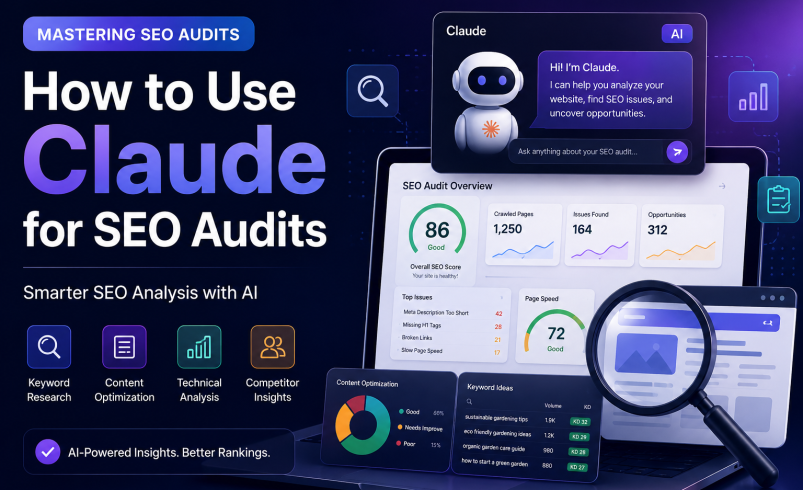

SEO professionals are always looking for smart ways to streamline their work and uncover deeper insights. Imagine having a super-smart assistant that can help you sift through data, brainstorm ideas, and even draft content suggestions. That’s where artificial intelligence, and specifically tools like Claude, come into play. These AI companions are transforming traditional SEO tasks, making complex analyses more accessible and efficient. If you’ve been curious about bringing AI into your workflow, you’re in the right place. We’re going to explore exactly how to use Claude for SEO audits, turning a potentially daunting task into a more manageable and insightful process.
Getting Started with Claude AI for SEO Audits
Claude is a powerful AI assistant developed by Anthropic, known for its strong natural language understanding and generation capabilities. Think of it as a highly intelligent conversational partner that can process vast amounts of text, summarize information, answer questions, and even help you create new content. For SEO, this means it can be an incredibly valuable addition to your toolkit, helping you tackle various aspects of an audit with greater speed and precision.
What Makes Claude a Great AI SEO Audit Tool?
Claude’s strengths lie in its ability to comprehend context, generate coherent and relevant text, and follow complex instructions. This makes it an excellent AI SEO audit tool. It can analyze content for readability, identify semantic relationships between keywords, and even help you understand user intent behind search queries. Unlike some other tools, Claude excels at nuanced language tasks, which is crucial for understanding the subtleties of search engine optimization. Its ability to process and synthesize information quickly means you can get to actionable insights faster, making your Claude AI for SEO efforts more impactful.
Preparing for Your First AI SEO Analysis
Before you jump into an AI SEO analysis, it’s helpful to understand how to best interact with Claude. First, ensure you have access to Claude (e.g., through a web interface or API). Familiarize yourself with its basic chat interface. The key to getting good results is providing clear, specific prompts. Think about what data you have (e.g., competitor URLs, keyword lists, content outlines) and what you want Claude to do with it. The more context you give, the better Claude can assist you in using AI for SEO analysis effectively.
Avoiding Common Data & Hallucination Pitfalls
While Claude is an exceptional processing engine, experienced SEOs must keep token limits and model behavior in mind:
• Token Context Windows: Large raw CSV exports from tools like Screaming Frog or Ahrefs can easily exceed context limits or cause key rows to be truncated. Always filter your audit exports to essential columns (e.g., URL, Title, Meta Description, Status Code) before uploading.
• Verifying Metric Data: Claude cannot independently compute live search volumes, exact Keyword Difficulty (KD), or realtime backlink counts without external tool data. Treat Claude as an analysis and synthesis engine—never rely on it as a source of truth for numeric ranking or volume statistics without cross-referencing your primary SEO tools.
Practical Steps: How to Use Claude for SEO Audits
Now for the exciting part: putting Claude to work! Let’s break down specific SEO audit tasks and see how to use Claude for SEO audits in a practical way.
Enhancing Keyword Research with Claude AI
Keyword research is the foundation of any good SEO strategy. AI tools for keyword research, like Claude, can significantly enhance this process. You can ask Claude to:
• Generate Keyword Ideas: Provide a broad topic or a few seed keywords, and ask Claude to brainstorm related long-tail keywords, questions people ask, and semantic variations.
• Analyze Search Intent: Give Claude a keyword and ask it to describe the likely search intent (informational, navigational, transactional, commercial investigation). This helps you tailor your content.
• Group Keywords: Paste a list of keywords and ask Claude to group them into thematic clusters, which is great for content planning and silo structuring.
• Identify Content Gaps: Provide a list of your current content topics and ask Claude to suggest related topics or angles you might be missing based on common search queries.
Example Prompt: “I’m writing an article about ‘sustainable gardening tips’. Generate a list of 20 long-tail keywords, common questions, and related topics that someone interested in this subject might search for. Also, tell me the likely search intent for ‘best organic fertilizers’.”
Boosting Content Optimization with Claude AI
Claude AI content optimization can help you refine existing content and plan new pieces. It’s excellent for:
• Content Audits: Paste sections of your content and ask Claude to identify areas for improvement in terms of readability, clarity, and keyword integration.
• Topic Coverage: Ask Claude to compare your content on a specific topic against what it considers comprehensive, suggesting missing sub-topics or angles.
• Semantic SEO: Provide your target keyword and ask Claude for related entities, synonyms, and concepts that should be included to improve semantic relevance.
• Drafting Meta Descriptions and Titles: Give Claude your content summary and target keywords, and ask it to generate compelling meta descriptions and title tags.
Example Prompt: “Review this paragraph about ‘benefits of cloud computing’ for readability and suggest ways to make it more engaging for a non-technical audience. Also, what other related terms should I include for better semantic SEO?”
Advanced E-E-A-T Quality Analysis Prompt
To audit your existing drafts for Google’s Experience, Expertise, Authoritativeness, and Trustworthiness (E-E-A-T) standards, use a multi-perspective system prompt:
Production E-E-A-T Audit Prompt:
“Act as a Senior Technical SEO Specialist and Content Strategist. I will provide an article draft. Analyze the content strictly against Google’s E-E-A-T Search Quality Rater Guidelines:
1. Experience: Pinpoint where first-hand personal experience or real-world practical examples are missing.
2. Expertise & Authority: Highlight factual claims, statistics, or software capabilities that require authoritative external citations or primary references.
3. Trustworthiness: Identify passive or overly generic language and replace it with direct, actionable expert recommendations.”
Uncovering Competitor Insights: Claude AI Competitor Analysis
Understanding your competitors is vital. Claude AI competitor analysis can help you dissect their strategies. While Claude can’t crawl websites directly, you can feed it data you’ve gathered:
• Content Strategy Analysis: Provide Claude with summaries or snippets of competitor content and ask it to identify their main themes, target keywords, and content formats.
• Identify Gaps: Ask Claude to compare your content strategy (described by you) against a competitor’s (also described by you) and pinpoint areas where you can differentiate or improve.
• SWOT Analysis: Give Claude information about a competitor’s online presence and ask it to perform a SWOT analysis from an SEO perspective.
Example Prompt: “Based on these descriptions of Competitor A’s top 5 blog posts and Competitor B’s main service pages, what are their likely primary target keywords and content strategies? Where do you see opportunities for my website to stand out?”
Overcoming Crawl Limits: Using Claude with MCP (Model Context Protocol) & Live Connectors
While standard chat interfaces require manual copy-pasting, modern workflows allow Claude to interface directly with live web environments and technical databases using the Model Context Protocol (MCP).
By connecting Claude Desktop to custom MCP server plugins (such as Puppeteer MCP, Google Search Console API bridges, or headless browser automation tools), you enable Claude to:
• Pull Live Search Console Data: Directly query performance statistics, track click impressions, and isolate pages experiencing sudden traffic declines.
• Inspect Live HTTP Headers & Metadata: Fetch live URL responses, parse DOM elements, and inspect canonical, noindex, or Schema markup without manual web crawling.
• Automate Technical Audits: Run multi-turn multi-agent routines where Claude fetches a page, captures mobile viewport screenshots, extracts heading hierarchies, and outputs structured structural fix recommendations in real time.
Streamlining Your SEO Audit Checklist with AI
An SEO audit checklist AI can help you organize and prioritize your audit tasks. Claude can assist by:
• Generating Checklists: Ask Claude to create a comprehensive SEO audit checklist tailored to a specific type of website (e.g., e-commerce, local business, blog).
• Summarizing Findings: After you’ve gathered data from various tools, feed the raw findings to Claude and ask it to summarize the key issues and their potential impact.
• Prioritizing Recommendations: Provide a list of identified SEO issues and ask Claude to prioritize them based on potential impact and effort, helping you with automated SEO audits with AI.
Example Prompt: “Generate a detailed SEO audit checklist for a small e-commerce website, covering technical SEO, on-page SEO, and content. Then, given these three issues: ‘slow page load speed on mobile’, ‘missing meta descriptions on 50 product pages’, and ‘low domain authority compared to competitors’, how would you prioritize them for immediate action?”
Advanced Prompt Chaining: Turning Raw Screaming Frog & GSC CSVs into Executive Summaries
For large-scale client sites, single prompts rarely capture full site context. Instead, expert practitioners use prompt chaining to process technical exports sequentially:
1. Phase 1 (Data Extraction): Feed a GSC export containing low-CTR keywords (high impressions, low clicks) and ask Claude: “Extract all queries ranking between positions 5 and 15 with CTR < 2%. Categorize them by intent.”
2. Phase 2 (Content Mapping): Paste your sitemap URLs or target content headers and ask Claude: “Match these underperforming query clusters to the matching URLs. Flag any pages suffering from keyword cannibalization.”
3. Phase 3 (Executive Summary Generation): Prompt Claude: “Format these findings into an executive matrix containing 3 columns: Technical Flaw, SEO/Business Impact (High/Medium/Low), and Developer Implementation Steps.”
Deep Diving into Your Site: Claude AI Website Analysis
For Claude AI website analysis, you’ll need to provide Claude with specific data points from your site. It can help you interpret and act on this data:
• Structure and Internal Linking: Describe your website’s structure or provide a sitemap, and ask Claude to identify potential improvements for internal linking or content silos.
• User Experience (UX) Insights: If you have user feedback or analytics data (e.g., bounce rates, time on page for specific pages), ask Claude to interpret what these metrics might mean for SEO and suggest improvements.
• Technical SEO Interpretation: While Claude can’t crawl your site, you can feed it technical audit reports (e.g., from Google Search Console or Screaming Frog) and ask it to explain complex issues in simpler terms or suggest solutions.
Example Prompt: “I have a high bounce rate on my blog post about ‘beginner’s guide to houseplants’. Based on this, what are some potential SEO-related reasons, and how could I improve the page’s user experience and content to reduce bounce rate?”
Auditing for AI Search Readiness: Generative Engine Optimization (GEO)
Modern SEO audits must evaluate more than classic organic search rankings. As search engines evolve into direct-answer generative systems (such as Google AI Overviews, Perplexity, and ChatGPT), auditing for Generative Engine Optimization (GEO) ensures your content remains discoverable:
• Checking AI Crawler Access: Use Claude to analyze your robots.txt configuration and ensure user agents like ClaudeBot, GPTBot, and PerplexityBot are not blocked from indexing key informational assets.
• Validating llms.txt Standard: Have Claude review or draft an llms.txt file—a structured markdown file located in your root directory that provides clean, high-density summaries of your core services and site taxonomy directly to LLM crawlers.
• Passage-Level Citability & AI Extraction: Ask Claude to evaluate whether your article sections contain concise, extractable answer blocks (40–60 words) immediately following H2/H3 question headers, maximizing your chances of being cited in AI-generated answers.
The Real Advantages: Benefits of AI in SEO Audits
Integrating AI, and specifically Claude, into your SEO audit process brings several compelling advantages.
Saving Time and Boosting Efficiency
One of the most immediate benefits is the significant time savings. Claude can automate many repetitive and time-consuming tasks, such as brainstorming keywords, summarizing content, or drafting initial recommendations. This frees up SEO professionals to focus on higher-level strategy, critical thinking, and creative problem-solving, rather than getting bogged down in manual data processing.
Gaining Deeper, Actionable Insights
AI’s ability to process and analyze large datasets quickly means it can often identify patterns and connections that a human might miss. Claude can help you uncover nuanced insights into search intent, content gaps, and competitor strategies, leading to more profound and actionable recommendations for your SEO efforts. It helps you move beyond surface-level observations to truly understand the underlying factors affecting your site’s performance.
Scaling Your SEO Efforts
For individual consultants or small SEO teams, AI tools like Claude can be a game-changer for scaling operations. They enable you to handle larger projects, conduct more frequent audits, and manage more complex analyses without needing to significantly expand your team. This means you can serve more clients or manage more extensive websites with greater efficiency and effectiveness.
Tips for Maximizing Claude’s Potential in SEO
To truly get the most out of Claude for your SEO tasks, keep these tips in mind.
Crafting Effective Prompts for Better Results
The quality of Claude’s output directly correlates with the quality of your input. Be clear, specific, and provide context. Define the role you want Claude to play (e.g., “Act as an experienced SEO consultant”), specify the format of the output (e.g., “Provide a bulleted list”), and include any relevant data or constraints. Experiment with different phrasing to see what yields the best results for your specific needs.
Combining AI with Human Expertise
Remember, Claude is a powerful assistant, not a replacement for human expertise. Always review and verify Claude’s outputs. Use its suggestions as a starting point for further investigation and strategic decision-making. Your human intuition, experience, and understanding of your specific business goals are irreplaceable. The best results come from a collaborative approach, where Claude handles the heavy lifting of data processing and generation, and you apply your strategic oversight and critical judgment.
Frequently Asked Questions About Using Claude for SEO Audits
Can Claude replace a human SEO auditor?
No, Claude cannot replace a human SEO auditor. While it’s an incredibly powerful tool for assisting with various audit tasks, human oversight, strategic thinking, critical analysis, and the ability to adapt to unique business contexts remain crucial. Claude excels at processing information and generating ideas, but the final strategic decisions and implementation require human expertise.
What are the limitations of using Claude for SEO?
Claude’s limitations for SEO include its inability to directly crawl websites, access real-time proprietary data from SEO tools, or perform technical checks like site speed tests. Its knowledge cutoff means it might not have the very latest information on algorithm updates. Additionally, without specific data inputs, it can only provide general advice. It’s a language model, so it relies on the information you provide and its training data.
Is Claude suitable for technical SEO audits?
Claude can be a valuable aid in technical SEO audits, but it cannot perform them independently. You would need to feed Claude data from technical SEO tools (like crawl reports, Google Search Console data, or site speed analyses). Claude can then help you interpret these complex reports, explain issues in simpler terms, suggest potential fixes, or prioritize technical recommendations. It acts as an interpreter and assistant, not a crawler or diagnostic tool itself.
Conclusion
Learning how to use Claude for SEO audits can truly elevate your SEO game. From enhancing keyword research and boosting content optimization to uncovering competitor insights and streamlining your audit checklist, Claude offers a versatile set of capabilities. It’s a fantastic tool for gaining deeper insights, saving time, and scaling your efforts. By combining Claude’s analytical power with your own human expertise, you can conduct more thorough, efficient, and impactful SEO audits. So, go ahead and explore how this friendly AI assistant can become an indispensable part of your SEO strategy!

3 Comments
-
[…] Informational Writing: Generating a structured 1,000‑word article on technical content creation. Evaluated for tone, structure, prose quality, and formatting. (See our broader guide on best AI tools for content writing.) […]
-
[…] search and sourced answers. Other AI tools can support adjacent content workflows too, including AI-assisted SEO audits, while the tools below are focused on search, research, or self-hosted AI […]
-
[…] with a thorough content audit is highly effective. You can check out my complete guide on How to Use Claude for SEO Audits to master the analytical side of your […]